Hello I’m back with the small css skinning for the Tooltip.
Firstly the idea of this blogging came from this forum post. One guy was posting about how to make the tooltip plain as of swing which is concern about the css skinning.
First let’s get start with the normal tooltip example.
|
1 2 3 4 5 6 7 8 9 10 11 12 13 14 15 16 17 18 19 20 21 22 23 |
public class TooltipTest extends Application { public static void main(String[] args) { Application.launch(TooltipTest.class, args); } @Override public void start(Stage primaryStage) throws Exception { StackPane stackPane = new StackPane(); Button butt = new Button("Test hello"); Tooltip tp= new Tooltip("Hello this is only the test"); tp.getStyleClass().add("ttip"); butt.setTooltip(tp); stackPane.getChildren().add(butt); Scene sc = new Scene(stackPane,500,500); sc.getStylesheets().add(getClass().getResource("gui.css").toExternalForm()); primaryStage.setScene(sc); primaryStage.show(); } } |
Here I’ve added my custom css file ‘gui.css’ for styling this application.
gui.css
|
1 2 3 4 5 6 7 |
.ttip{ -fx-background-radius: 0 0 0 0; } .page-corner { -fx-shape: " "; } |

Let’s Play with the CSS.
|
1 2 3 |
.ttip{ -fx-background-radius: 7 7 7 7; } |
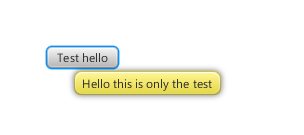
|
1 2 3 4 |
.ttip{ -fx-background-radius: 0 0 0 0; -fx-background-color: linear-gradient(greenyellow , limegreen ); } |

|
1 2 3 4 |
.ttip{ -fx-background-radius: 0 0 0 0; -fx-background-color: linear-gradient(orange, orangered ); } |

|
1 2 3 4 |
.ttip{ -fx-background-radius: 0 0 0 0; -fx-background-color: linear-gradient(cyan , deepskyblue ); } |
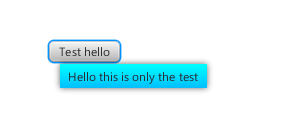
I hope you guys enjoy with this small CSS stuffs. This much for today.
Thanks. 🙂
Pingback: JavaFX links of the week, March 12 // JavaFX News, Demos and Insight // FX Experience
Pingback: inspiration
Hi Narayan,
Nice blog post, thank you! I have tried your tooltip skinning with JavaFX 2.1 and I haven’t succeeded in removing the page corner.
Nicolas
Hi Nicolas,
are you sure you have used the background-radius property of the css ?
Thanks
Yes, I have tried with this CSS:
.ttip {
-fx-background-radius: 5 5 5 5;
}
.page-corner {
-fx-shape: “”;
}
The page corner is still displayed but the radius is applied to the tooltip.
Hi Nicolas,
I think the inverted comma you have given in -fx-shape property is not correct. Please use the correct inverted comma. All of your code is just correct I’ve tested and it works on mine .
Thanks
Narayan.
Hi Narayan,
Hum, it’s weird, I have done a copy-paste from your source code…
I have tried with this SVG path “M 0 0 z” for the page corner shape and then the page corner hasn’t been displayed.
Thanks.
Nicolas
Good article Narayan,
I have been trying to style the tooltip recently and was very interested in your article. One thing that I was not able to acomplish, is to change the font color. I hoped you had tried this in your tests, but I see you havent.
Have you been able to acomplish this?
Thanks,
Enrique
Hi Enrique,
To color your text you need to add this attribute. Suppose you are going to color the text with red color then the css must be like this.
.ttip{

	 -fx-text-fill:red;

 }
Thanks
Narayan
Yes, that would be the obvious way. But unfortunately it doesn’t work in Javafx 2.1. Many things don’t work as expected in the CSS styling, but otherwise I’m very happy with Javafx.
Hello Enrique,
I ‘ve also looked on the this things in 2.1 and saw same problem. And found that we need to use like this to work correctly:
.page-corner {

	-fx-shape: " ";

}
In above i’ve used space inside value of -fx-shape .
Thanks
Narayan
Hi
is there a way to define how long the popup windows pops up
cheers
Currently there is nothing like that . But I would recommend you to add some event handler in mouseOut and mouseIn of the Control where you are using that Tooltip. And control the disable and enable of the Tooltip by using hide() or show() function . Or even more you can control the timing of the hiding the Tooltip on event handler of onShowingProperty
Is there any limitation according to JavaFX version? I’m using JavaFx 2.2.7 and the CSS code don’t work:
.ttip{
-fx-background-radius: 0 0 0 0;
-fx-background-color: linear-gradient(cyan , deepskyblue );
-fx-text-fill: white;
}
.page-corner {
-fx-shape: ” “;
}
@leonardo,
all css are same 🙂
.ttoltip as the default css style is not working…. at least here using Java 8 sith build 86… and it didn’t worked on 2.1 or 2.2 we need to use the “base” css class cause we have several (houndreds may be) tooltips on our App and we don’t want to take the risk to loose any of them on applying the style.
Hi carlos,
.ttoltip is not the default css style class use .tooltip instead. Did you see that I used “.ttip” because I have defined
getStyleClass().add("ttip");. If you don’t want the user-defined class then use base class “.tooltip“.Thanks
Narayan
I meant .tooltip … it didn’t work .ttoltip was a “finger mistake”… my CSS says:
.tooltip{
-fx-background-color: linear-gradient(blue,lightskyblue);
-fx-background-radius: 5;
-fx-wrap-text: true;
}
and using JavaFX 2.2 there’s no change on the “yellow” tooltip style, using Build 86 of Java 8 the tooltip is black, cause that’s the default since build 84.. something wrong with that CSS definition?
Hi Carlos,
Your css works perfectly. I have tested. The output of your tooltip css is like this: http://s10.postimg.org/kjexdogw9/Untitled.png
I am using jdk1.7.0_13 with javafx 2.2.5.
Thanks
Hi Narayan ,since there is a version difference css might working at your end for javafx 2.2 css doesn’t work at my end… help would be greatly appreciated.
Hi shyam,
I am afraid to know about the javafx css incompatibility because there should not be difference in CSS codes. Please check your css code correctly. I could help if you could print me some css code and your actual javafx version.
Thanks
Seems to be a “broken tooltip” implementation on JDK8 tooltips are not being styled from css and FXML, they are using modena like the main styled sheet, you can set a “similar” sheet as your agent and style the tooltip there. This is a very risky work around since it can be css values that are not given to a control and you can brake something that is not broken. I hope this bug is fixed soon, in build 91 of JDK 8 haven’t been resolved.
Greetings
Hi,
I am using the version javafx 2 with kepler and I tried with :
.tooltip{
-fx-background-color: linear-gradient(blue,lightskyblue);
-fx-background-radius: 5;
}
.page-corner {
-fx-shape: ” “;
}
It is not working. Do you have any ideas ?
I tried to do tooltip modification with CSS it works here in Jdk8u11
Hi Nono,
I have tested your code in Jdk 8u11 it works very great. But I don’t know of javafx 2 as I don’t have old version of Javafx2 . May be your css is not taking correctly by Eclipse I am right now in Netbeans. I am sure that it should work as I had written this blog post during the Javafx v.2 release time.I have attached an image
http://tinypic.com/r/2exq1r6/8
Thanks
I am currently having a issue with the tooltip cursor. My issue is pre-tooltip I click something my cursor changes to a image, than when I drag that image(the cursor) over a object and the tooltip pops-up, the image-cursor turns into the arrow cursor. How can I stop the tooltip cursor from interfering with the image cursor.
please what is page corner used for…..cause it is confusing. and how do i add both it and tool tip class to the tooltip